St. Patrick's Day Challenge
OLPC
1. Start here.
2. Next, visit here
3. Then go here, make sure to watch the videos on Rwanda and Colombia
XO2
Monday, March 16, 2009

Friday, March 13, 2009
Internet Safety/How To Keynotes
Today's Tasks
1. Finish your How To Keynote
- final version should be submitted to the 2013 Drop Box
- named 1_madsonjamie_howto
2. Internet Safety Video & Quiz
- Click here to access the Internet Safety video. When you are finished watching the video, complete the Internet Safety Quiz.
Thursday, March 12, 2009
How To Work Day
Wednesday, March 11, 2009
How To
- Fill out the How To Presentation form.
- Use Google image search to start image mining for your How To presentation. Remember to save the URLs.
Monday, March 9, 2009
First Day
Welcome to the 8th Grade Edition of Digital Literacy. I'm excited to build on what you learned last year. Today's tasks are detailed below.
Change your desktop background to the standard Apple blue.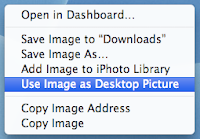
(this is a no exceptions policy...changing your desktop background will result in a network violation)
Remove all files from your desktop.
View the Meet Henry and Death By Powerpoint presentations.
Complete the online form Presentation Design.
Change your desktop background to the standard Apple blue.
- open Safari
- go to this website
- control-click on the image
- select this

(this is a no exceptions policy...changing your desktop background will result in a network violation)
Remove all files from your desktop.
- everything must be stored in your Documents folder
- develop a system for organizing your stuff
- have your folders checked by Mr. Madson
View the Meet Henry and Death By Powerpoint presentations.
Complete the online form Presentation Design.
Meet Henry
View SlideShare presentation or Upload your own. (tags: meet henry)
Death by PowerPoint
View SlideShare presentation or Upload your own. (tags: tips powerpoint)
Begin designing your How To Presentation
Wednesday, March 4, 2009
Final Test/Course Evaluation
Today is a quiet work day. Your task over the course of the next two days is to participate in the World Math Day and complete the Final Test/Course Evaluation.
World Math Day Update
As of 7:45 this morning, our totals were...we are less than 8,000 correct answers from our goal!

And, the big news is...the world record has been shattered! As of 7:45 this morning, the worldwide total was. Those of you who participated have now officially been a part setting a new world record. Congratulations.

Tuesday, March 3, 2009
Doodle for Google/World Math Day
Welcome to World Math Day 2009! Our goal for the next two days is 25,000 correct answers. Before you start competing, you should first type your Doodle 4 Google Artists Statement. According to the contest regulations, your artist statement should follow the format below.
Please tell us briefly about how your doodle expresses the "What I Wish for the World" theme (max 50 words).
When finished, your statement should be printed out and turned in to the appropriate art folder.
Finally, at some point in the next two days you should check the Assignment Checklist to ensure you are done with your tasks for Digital Literacy.
Subscribe to:
Posts (Atom)

 Posts
Posts


