skip to main |
skip to sidebar

Our final task with Google Earth involves putting together an audio tour of the five places you would like to visit in your lifetime. Details are below.
World Tour
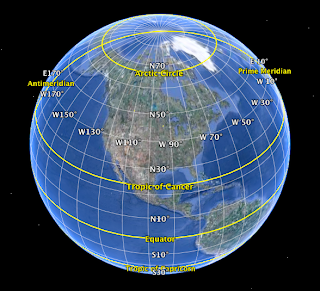 Today you will be using Google Earth and the internet to locate the specific coordinates of locations around the globe. Click here for specific instructions.
Latitude & Longitude
When you finish, you should complete the following tasks.
1. Complete the Estimation problem. (you only need to complete the parking lot problem, this is a change from yesterday)
2. Complete the Google Earth Activities task list.
3. Complete the Complex Area Problem task.
4. Finish up any work on your Fairy Tale News or Wanted Poster.
5. Begin creating your Software Log. Your Software Log should be a table created in Pages. The steps to creating a table are listed below.
- open Pages
- select blank document
- save the document to your Digital Literacy folder (1_madsonjamie_software)
- click on Table
- set up a Table for three columns and twenty rows
- label the columns (Software, Description, Used For...)
- make entries for the following programs
- Firefox or Safari
- Keynote
- Type to Learn
- Pages
- Google SketchUp
- iPhoto
- Google Earth
- Scratch
- Microsoft Excel
- Weebly

I am home today with two sick kids : one ear infection and one strep throat. Your task is to work on the Google Earth tasks detailed below.
1. Complete the Estimation problem. (you only need to complete the parking lot problem, this is a change from yesterday)
2. Complete the Google Earth Activities task list.
3. Complete the Complex Area Problem task.
4. Finish up any work on your Fairy Tale News or Wanted Poster.
5. Begin creating your Software Log. Your Software Log should be a table created in Pages. The steps to creating a table are listed below.
- open Pages
- select blank document
- save the document to your Digital Literacy folder (1_madsonjamie_software)
- click on Table
- set up a Table for three columns and twenty rows
- label the columns (Software, Description, Used For...)
- make entries for the following programs
- Firefox or Safari
- Keynote
- Type to Learn
- Pages
- Google SketchUp
- iPhoto
- Google Earth
- Scratch
- Microsoft Excel
- Weebly
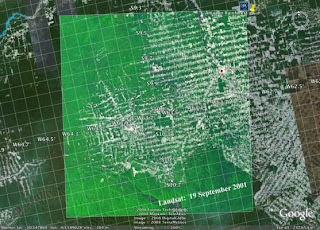 Today we are going to do some estimating with Google Earth.
Follow the steps below.
1. Open the kmz file called Estimation.kmz (in 2014 Public/Digital Literacy/Google Earth)
2. Create a projects folder in your Google Earth
3. Follow the steps detailed in the Estimation file.
4. Record your answers on the Estimation Form.
Click here for more help on calculating ratio.
One cool thing about Google Earth is the ability to find your own house. But that's just scratching the earth's surface of what is possible with this software. Today you will begin exploring the new version of Google Earth : Google Earth 5.0. See below for some highlights from this significant upgrade.
Google Earth 5.0
After exploring the new possibilities with Google Earth 5.0, you will complete the Complex Area Problems Activity. Your answers should be submitted using the form below.
Complex Area Problem
Area and Surface Formulas
You will continue with your Fairy Tale News today. When you finish, you should turn it in to the 2014 Drop Box/Digital Literacy.
After Fairy Tale News, you should print out a BW copy of your Wanted Poster. This copy should be placed into the hour folder for Language Arts.

 Today you will be using Google Earth and the internet to locate the specific coordinates of locations around the globe. Click here for specific instructions.
 Today we are going to do some estimating with Google Earth.
 Posts
Posts


